

Mobile app development is one of those topics that comes up again and again in business discussions, for one simple reason. Apps aren’t cool anymore. They stopped being new a long time ago. What’s changed is that customers have quietly come to expect a certain level of ease, and any business that doesn’t provide that starts to feel like more work than it needs to be. A good mobile application doesn’t need to wow anyone. It just has to do one thing: booking, ordering, tracking, paying, or asking a question a little less annoyingly than it does now. And the businesses that actually get value from mobile app development are almost always the ones that treated the app as a fix for something specific. Not a miniature version of their website.
Why Businesses Are Investing in Mobile Apps
No one wakes up one day and decides they need an app for no other reason than that it sounds good on a pitch deck. There’s usually some kind of trigger. Customers keep asking for one. A competitor launched theirs first. Or the website simply wasn’t built with a phone in mind, and it shows every time someone tries to use it standing in a queue.
A few reasons keep cropping up again and again. For one thing, it’s easier to access. The app just lives on the home screen, so there’s no hunting down a website or re-typing login details every single time. Better engagement usually follows soon after, since push notifications and faster checkouts just bring people back more. There’s personalization too, as an app can remember someone’s order history in a way most websites never quite manage. And faster communication, because in-app chat cuts out a lot of the email back-and-forth that used to eat up half a day.
Customer retention also tends to improve, mostly because it’s easier to stay loyal to a business that removes friction rather than adds to it. Notifications go straight to the customer, not filtered by some algorithm deciding if it’s even worth showing them, which is more than businesses running entirely on social media can claim. There’s often a real revenue story too. Apps make loyalty programs, subscriptions, and in-app purchases easier to run than almost anything else. And app usage data tends to be more granular than regular website analytics, so businesses end up understanding their customers a little better on top of everything.
None of this is a guarantee, though. An app built for no good reason just becomes another icon people ignore until they delete it during a phone cleanup. The payoff only shows up once the app is actually solving something for whoever’s holding the phone.
What Makes a Mobile App Worth Using?
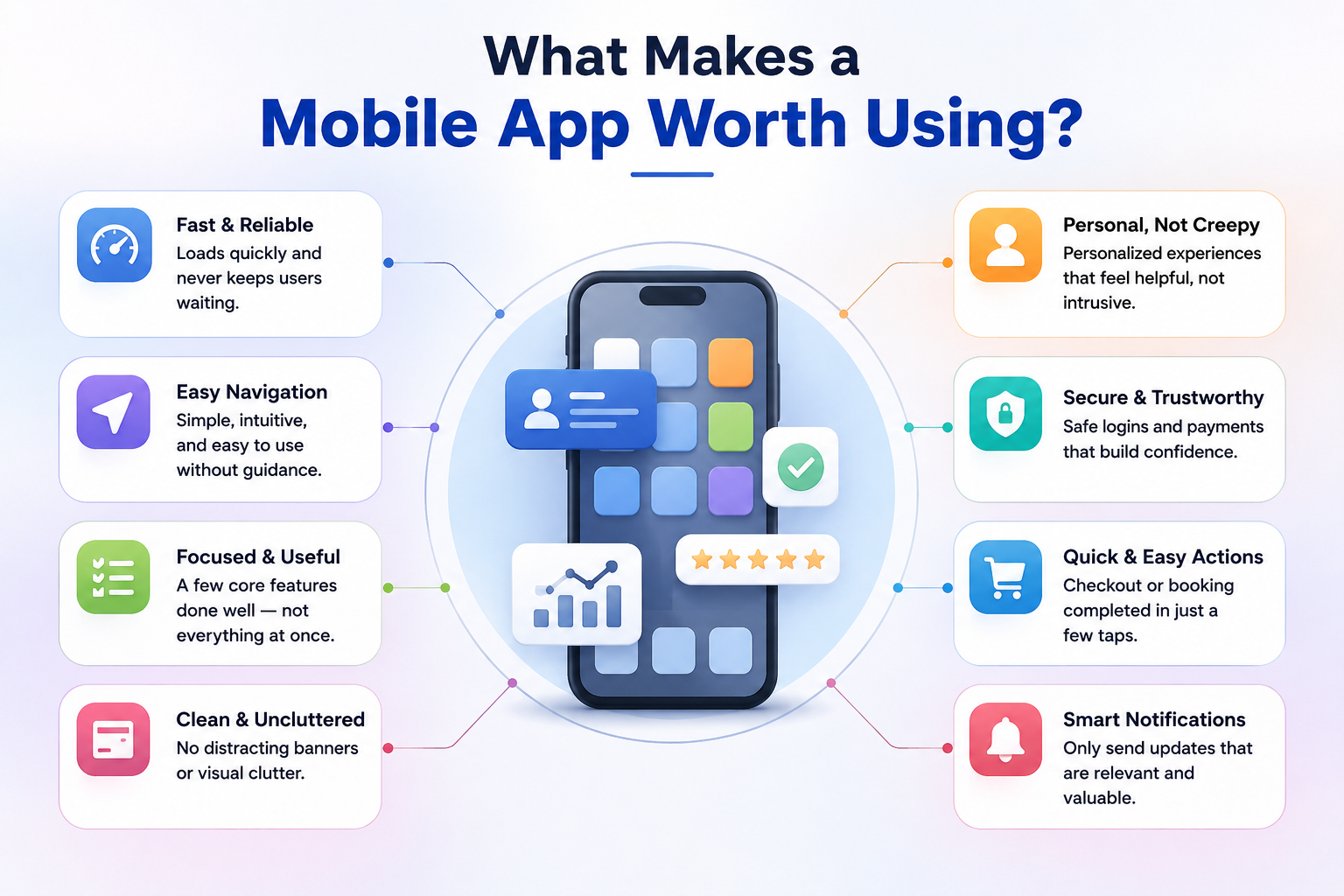
Ask a business owner what they want from their app, and you’ll hear “professional,” “modern,” and maybe “feature-rich.” Ask their customers what keeps them coming back to an app, and honestly, the answer is a lot more boring in a good way.
People stick with apps that load quickly and don’t leave them waiting for a spinning wheel. Navigation that doesn’t need explaining. A handful of things done well, instead of everything done half-heartedly. Clean, not cluttered with banners. Personalized, but not creepy about it. Payments and logins that don’t make anyone nervous. Checkout or booking down to a few taps instead of ten. And notifications that are actually worth reading, not noise.
Notice “impressive design” isn’t really anywhere on that list. What customers don’t typically do is sit around admiring an app’s visual polish; they notice the opposite when something’s slow, confusing, or takes more effort than it should. Clearing that basic bar comes before anything fancier gets to matter.
Mobile App Development Should Start With the Problem
There’s one mistake that shows up constantly in mobile app development: choosing features before choosing the problem. A business owner sees a competitor’s app, likes a couple of things about it, and asks for something similar without stopping to ask what their own customers are actually struggling with in the first place.
Take a retailer whose customers reorder the same items every month but have to dig through the website to find them each time. A long feature list isn’t the priority there. It’s a quick, almost thoughtless reorder flow.
Or a healthcare provider drowning in phone calls just to get appointments scheduled and rescheduled. The job of the app, in that case, is a simple booking system that actually works. Not animations. Not extras.
A repair or maintenance company might have customers calling constantly to ask, “Is it done yet?” A single well-built status-tracking feature can matter more there than an app packed with things nobody asked for.
And a startup building something entirely new is playing a different game altogether. There’s no existing behavior to improve, just an idea that needs testing with real people first before anything else gets decided.
Point being, the right approach to mobile app development depends on the business itself and what the customer’s actually trying to get done. Features come after that question is answered. Never before it.
Choosing the Right Approach to Mobile App Development
Once the problem’s clear, the next question is how to actually build the thing. This is where native, cross-platform, and custom mobile app development come into play, and they suit fairly different situations.
Native apps are built separately for iOS and Android using each platform’s own tools. It generally gives the best performance and the tightest integration with hardware cameras, GPS, biometric login, and that sort of thing. It tends to suit apps with heavy graphics, offline functionality, or anything pushing device features hard.
Cross-platform app development means building one codebase that runs on both iOS and Android. It’s usually quicker and cheaper to build, so it’s a solid choice for businesses that want both platforms without paying for two separate builds. For a lot of business apps, booking tools, e-commerce, and service platforms, cross-platform holds up perfectly well.
Custom mobile app development, meanwhile, is about building around the way a business actually works, instead of trying to fit an off-the-shelf template around it. This matters most when a business has processes that don’t slot cleanly into a generic app builder, unusual booking logic, a particular inventory setup, or integrations with software they already rely on.
There isn’t really a “best” one among the three. It really comes down to who’s using the app. If a customer base leans more Apple-centric, iOS app development might carry more weight. In markets where Android is the dominant platform, Android app development might matter more. It’s common for businesses to eventually need both, which is exactly why it’s worth carefully weighing cross-platform and custom approaches rather than simply going with whatever a developer happens to prefer.
Features That Can Add More Value to a Business Mobile App
It’s tempting to want every feature known to man. In practice, the apps that actually work well tend to include only what supports the reason they exist in the first place. Registration and login that feels like a breeze. Push notifications for updates or deals. Search and filters, if the catalog is large enough to need them. Secure online payments. Booking and scheduling for anything service-based. Location features for delivery or multi-branch setups. In-app messaging or help chat. Analytics dashboards that the business side actually uses. Social login, to reduce signup friction. Profiles that save information securely.
Not every app needs all of this. Not at all. A small, single-location service business might only need booking and reminders. A retail app might lean more heavily on search, payments, and order tracking. What matters is that the list reflects the real needs of the business, not a generic checklist copied from somewhere else on the web.
Security and Performance Cannot Be Afterthoughts
It’s easy to get caught up in features and design and push security down the road until “we’ll sort that out later.” That’s usually a mistake that shows up after launch, not before.
A few things worth getting right early: secure authentication, so login credentials stay protected. Strong data protection for how customer information is stored and transferred. Payment security, especially when third-party gateways are involved. API security, since most apps are constantly talking to backend services. Regular testing, so problems get found before customers find them first. Performance optimization, so things don’t slow to a crawl as more people start using the app. Regular updates to stay compatible with new phones and OS versions. And compatibility testing on the actual devices and screen sizes people are using, not just the one the app was built on.
That doesn’t mean a business owner has to become technical overnight. It’s just good to know these pieces exist and to ask whether they’re being properly handled rather than treated as something to bolt on right before launch.
How the Mobile App Development Process Works
If you’re doing this for the first time, it can feel a bit like a black box. Stripped down, it usually goes something like this. First, business and requirement analysis: finding out what’s really needed, not just what’s being asked for. Then market and competitor research to see what similar apps do right and where they miss the mark. Next is UX/UI planning, working out how someone will move through the app before any visuals get touched, followed by a prototype, something clickable to react to before real development even begins.
Development itself covers the front-end people see and the back-end running behind it, alongside API and backend integration to hook the app up to databases, payments, or outside services. Testing checks functionality, performance, and security across a range of devices before deployment, which is really just pushing the app to the App Store and Google Play. And then there’s monitoring and improvements, seeing how the app performs once real people are using it and making changes based on that.
For a business owner, this mostly means some back-and-forth early on, reacting to prototypes and giving feedback on flow before development actually picks up any real speed. It’s almost never a straight path from concept to finished app. That’s normal. Not a sign of trouble.
How to Choose a Mobile App Development Partner
When picking a mobile app development company, it’s less about picking the biggest name and more about picking the right fit for this particular project.
Worth checking: a relevant portfolio. Have they built something in a similar space or of similar complexity? Do they ask about the business too, or just about features? Is UX/UI a real part of the process or an afterthought added on at the end? Do they have real-world experience with the platforms and integrations this project will need, and is there a proper testing process in place rather than something rushed at the end? How well do they communicate as things move along, and what happens after launch when bugs appear or an update’s needed because it will be needed sooner or later? Can the app scale with the business? Does security have an actual approach behind it? And is the scope spelled out clearly, including what happens if requirements shift halfway through?
A conversation with a prospective partner should feel like they want to understand the business. Not just close the deal and move on to the next one.
Build an App Around Your Customers, Not Just Your Features
Worth returning to where this all began. Businesses don’t win with mobile apps by cramming in every possible feature. They win because the app actually makes something easier for the person using it.
That means usability over complexity, reliability over novelty, and steady improvement over the “launch it and walk away” approach. It’s usually better to have an app that does one thing really well than one that tries to do everything and doesn’t do any of it particularly smoothly. Customers don’t rate apps on ambition. They’re just checking whether the thing they came to do actually got done.
Generally, mobile app development works better when it’s treated as a business decision first and a technology purchase second. The apps that end up mattering are the ones built around a real customer need: booking faster, reordering easier, tracking simpler, and communicating more directly. The technology choice native, cross-platform, or fully custom should be driven by that need, not the other way around. Get that order right, and everything that comes after tends to fall into place a lot more easily.
Creating Mobile Experiences With Creatah
Creatah works with businesses to plan and build mobile applications based on what they actually need, not a template stretched to fit. It usually starts with figuring out what the customer needs the app to do, then working out the right platform, design, and feature set to match. Whether it’s a simple booking app or something with more custom logic behind it, the goal stays the same: build something that fits how the business really runs and what its customers actually need from it.
Let’s Build Your Mobile Application
Sitting on an app idea but not sure where to begin? That’s a pretty normal place to be. Talk to Creatah about your idea, your customers, and what you hope the app will solve we’ll help you figure out the right approach from there.
Get in touch to begin the conversation.
