

Android is on more phones than any other operating system on the planet, and that one fact quietly changes how a lot of businesses think about building an app. For many companies, it’s no longer a question of “Should we build an app?” It’s “let’s get the Android side right,” because that’s where the bulk of the customers already are. That’s when Android app development moves from being a pure technical decision to something closer to meeting customers where they already spend their day, on a device running an OS they probably never thought twice about picking.
That’s the attraction. It’s also where things can go sideways fast. Android isn’t a single device or screen size. It’s thousands of devices, made by dozens of manufacturers, running different versions of the OS at any given moment. A business that treats Android app development as a “lesser,” cheaper version of building for iPhone usually ends up disappointed. Done right, though, it tends to be one of the more practical ways to reach a genuinely wide customer base without a ton of extra expense.
Why Android Matters So Much for Businesses
Honestly, the biggest strength of Android for a business is just reach. Android holds the majority of phones in most markets outside the US, sometimes by a wide margin. That means a solid Android app development strategy can put a business in front of a customer base an iOS-only app would never touch.
There’s also the openness of the platform. Android allows more flexibility around distributing apps, accessing device hardware at a lower level, and customization options that iOS tends to lock down. For businesses building anything involving payments, loyalty programs, or location-based features, that flexibility usually means more functionality with less friction getting in the way.
Cost remains a factor too. Publishing an Android app is generally easier, especially through the Google Play ecosystem, than publishing through Apple’s App Store. That doesn’t mean it’s automatically cheaper to build overall, since device fragmentation adds its own cost, but it does mean businesses have more room to experiment, push updates faster, and iterate without waiting on lengthy review cycles.
And there’s what a strong Android presence signals to a large segment of a business’s audience. Accessible. Modern. Not built only for the customers who happen to own the newest, most premium devices.
What Actually Makes an Android App Good
A business owner might picture “a good app” as one packed with features. Customers usually set a much lower bar. They just want it to open quickly, not crash on whatever phone they happen to have, and do what it’s supposed to do without extra steps getting in the way.
Given how many device types Android covers, performance consistency matters here more than almost anywhere else. An app that runs beautifully on a flagship phone but stutters on a budget device isn’t really a good app. It’s a good app for a small fraction of the audience. Battery efficiency matters too Android users tend to notice, and get annoyed, when something is quietly draining their phone in the background.
Beyond that, the usual basics apply. Simple navigation, fast load times, secure logins and payments, notifications that feel useful instead of like noise. None of that changes just because it’s Android. What changes is how much testing it takes to make sure all of it actually holds up across such a wide range of hardware.
Android App Development Should Start With the Business Problem, Not the Play Store Listing
It’s easy to get pulled into thinking about an Android app in terms of what the Play Store listing will look like the screenshots, the description, and the star rating. None of that matters much if the app doesn’t solve something real for whoever’s downloading it.
A delivery business might have customers calling constantly to check order status when a simple tracking screen inside the app would remove most of those calls on its own. A retail business that notices most of its Android traffic comes from people browsing on the go probably wants something light and fast, rather than an app crammed with catalog features nobody scrolls through anyway.
A service business, home repair, logistics, or whatever might find scheduling is the real headache, and that alone can be reason enough to build an app in the first place. A startup entering an unfamiliar Android market might want to test a much smaller version of the idea before investing in anything bigger.
The starting point isn’t “What features should our Android app have?” It’s “What’s actually broken or annoying for our customers right now, and can an app fix that?”
Choosing the Right Android Build: Native, Hybrid, or Cross-Platform
There are a few real options for businesses building specifically for Android, and the right choice depends more on the goal than on personal preference.
Native Android app development means using Kotlin or Java and building directly within Android’s own environment. This typically offers the best performance, the deepest access to device hardware, and the smoothest long-term compatibility with new Android versions. Generally, the right call for anything leaning heavily on device features, camera-based functionality, offline capability, background processing, or anything performance-sensitive.
Cross-platform app development using a framework like Flutter or React Native means a single codebase can run on both Android and iOS. For a lot of business apps, this ends up being the practical middle ground. It cuts down development time and cost while still delivering something close to native performance for most use cases, like booking, e-commerce, or service platforms.
Custom mobile app development is the way to go when a business has workflows or logic too specific and unique for a generic template or app builder to handle well. This applies whether the build ends up native or cross-platform; it’s really about how much customization is needed, not which technology gets chosen.
Native tends to be worth the extra cost for businesses with a strong Android-focused audience, where performance or hardware integration genuinely matters. Cross-platform is often the more sensible route for businesses trying to cover both Android and iOS without doubling the budget.
Features Worth Considering in a Business Android App
Not every Android app needs every feature out there, but a few show up often in the apps that actually do well for businesses. Easy account creation and login, without ten steps to get through. Push notifications, used sparingly enough that customers don’t just turn them off. Search and filtering for larger product or service catalogs. Secure in-app payments. Location-based features for delivery, retail, or multi-location businesses. Offline functionality, which matters more on Android given how patchy network conditions can be in a lot of markets. In-app support and messaging. Analytics on the business side, to see where people drop off. Social login based on a Google account, since it fits naturally with Android.
The right mix depends entirely on what the business is trying to solve. Offline functionality and location tracking might matter most to a logistics company. A retail brand might care more about search, payments, and personalization. Building around an actual list of needs beats copying a feature checklist from somewhere else.
Security, Performance, and Device Fragmentation
Android’s real technical challenge isn’t security or performance on their own; it’s the sheer variety of devices an app has to work across. If a three-year-old phone with limited memory can’t run the app nearly as smoothly as a brand-new flagship, the business risks losing a significant portion of its audience without even realizing it.
A few areas deserve particular attention. Secure authentication and data handling, especially given how often Android apps request permissions during setup. API and backend security, since most business apps depend heavily on communication with the server. Testing across device tiers — not just flagship phones, but mid-range and budget devices too. OS version compatibility, since Android updates roll out unevenly across manufacturers and regions. Battery and memory efficiency, which affects both user experience and app store ratings. And regular updates, to keep pace with new Android releases and security patches.
A business owner doesn’t need to understand all of this in depth. The point is knowing that Android’s fragmentation is a real technical consideration, not something to shrug off, and that a development partner should actually be testing for it rather than assuming one device represents the whole user base.
How the Android App Development Process Typically Works
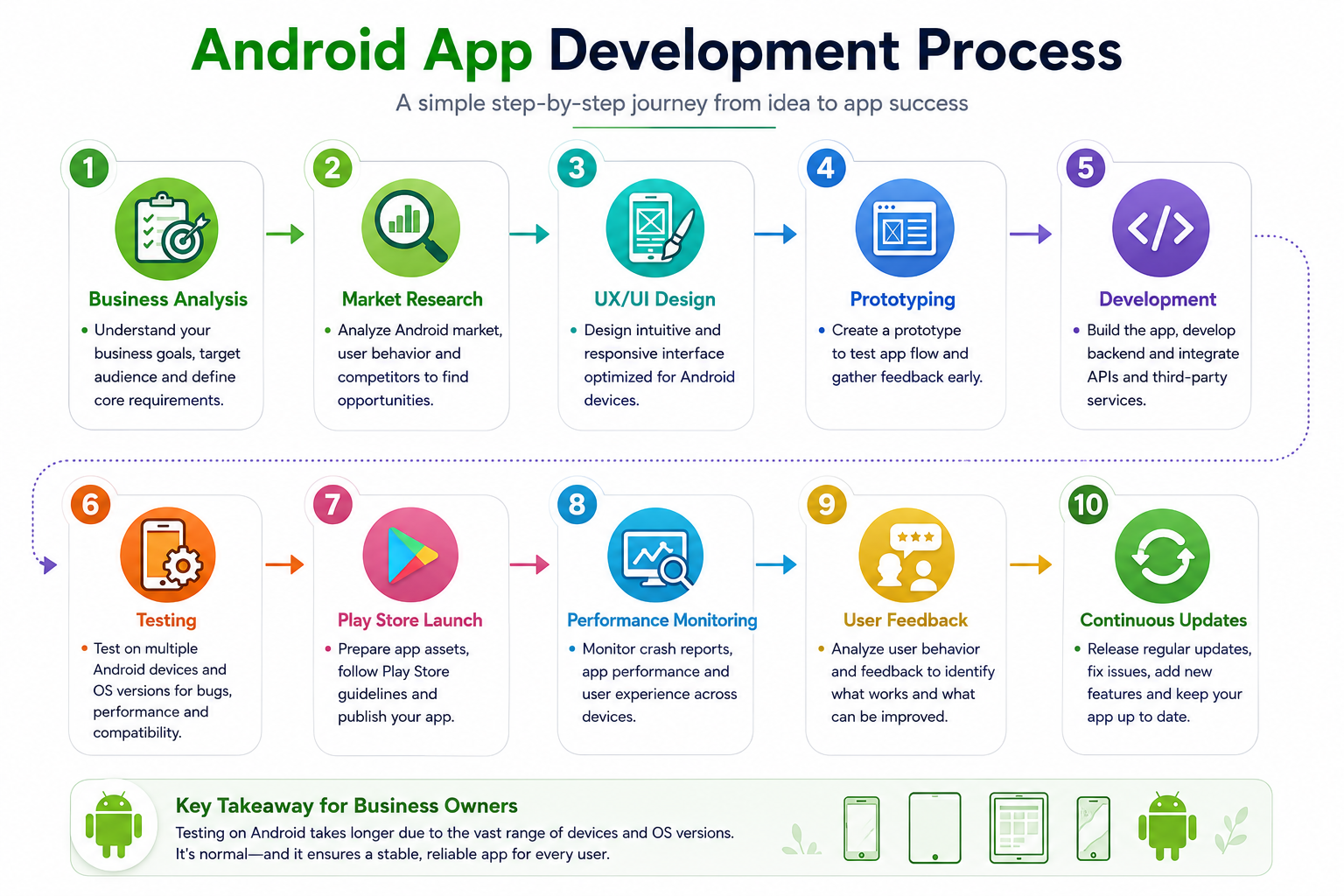
This generally looks similar to mobile app development for any platform, with a few Android-specific things layered in.
It usually starts with business and requirement analysis, then research into how competitors are approaching the Android side of the market specifically, since Android usage patterns can differ quite a bit from iOS even within the same industry. UX/UI planning comes next, accounting for the different screen sizes and navigation patterns common across Android devices, followed by a prototype to react to before real development begins.
Development covers the front-end interface and back-end systems, along with integration into whatever APIs or services the app depends on. Testing ends up being a bigger part of the process here than it might be for a single-device platform, since it needs to cover a genuinely representative range of Android devices and OS versions. Deployment to the Google Play Store follows once that’s done, and then ongoing monitoring kicks in tracking crash reports, watching performance across device types, and seeing how real users are actually behaving inside the app.
For a business owner, the practical takeaway is that testing on Android usually takes longer than people expect. That’s not a warning sign. It’s simply a reflection of how diverse the Android device landscape actually is.
Finding the Right Partner for Android App Development
Choosing the right Android app development company is about more than just looking at a portfolio; there are a few practical checks worth making.
Worth asking: Do they actually test across a range of Android devices, or mostly just flagship phones? Do they understand Android-specific design patterns, or are they just porting over an iOS-first design and calling it done? Is there a real plan for handling different OS versions and manufacturer customizations? How do they handle Play Store submission and any policy issues that come up along the way? What does post-launch support actually look like when a new Android version breaks something unexpectedly?
Partners who treat Android as a platform in its own right, quirks and all, tend to deliver a more reliable result than those who just apply the same approach they’d use for iOS and relabel it.
Build for the Android Audience You Actually Have
It’s tempting to design an Android app around a mythical user with the latest phone and fast internet everywhere they go. The more useful approach is designing around the actual range of devices and conditions real customers are dealing with, which, on Android, tends to be a lot wider than most businesses assume going in.
That means testing broadly, keeping the app lean, and being honest about which features genuinely add value versus which ones just add weight. An Android app that works well across a broad range of devices will almost always beat one built with only the latest hardware in mind.
Android app development pays off for businesses that take the platform’s scale and diversity seriously, instead of treating it as a smaller, cheaper version of building for iPhone. The reach is real. The cost efficiencies are real. So is the extra testing work that comes with supporting so many devices and OS versions. Get the fundamentals right: a clear problem worth solving, the right development approach, and proper testing across device types, and an Android app can end up being one of the more effective ways a business actually reaches its customers.
Building Android Apps With Creatah
Creatah works with businesses to plan and build Android apps around what their actual customer base looks like, rather than assuming one device or user profile fits everyone. That starts with understanding the business problem the app needs to solve, then working through the right development approach, feature set, and testing plan to match. Whether it’s a native Android build or a cross-platform app meant to cover Android and iOS together, the goal stays the same: something that holds up across the real range of devices customers are actually using.
Let’s Build Your Android App
Thinking about an Android app but not sure whether to go native or cross-platform? That’s a completely reasonable place to start from. Talk to Creatah about your business, your customers, and what you actually want the app to solve, and we’ll help you figure out the right approach from there.
Contact Us to begin the conversation.
